IP Addresses, Packets, and Routing
IP Addresses
Internet Protocol Addresses (IP Addresses) are numbered addresses for devices or websites within a network, mainly the Internet. As mentioned in the video, “The Internet- IP Addresses and DNS Part 3”, these addresses are like home addresses in real life where they list the region, country, subnet, and device all in one set of numbers. While not explicitly stating the location of the device, your computer will know how to get the address when it attempts to connect or send something to it. Routers on your network will communicate with other routers and network devices in order to figure how many hops it will take for you to reach your destination. This wonderful invention was the result of the previous work of Vint Cerf and Bob Kahn. There are two types of IP addresses, IPv4 and IPv6. IPv4 was the original address format, which contained a set of 32-bit (4 octets) addresses used to identify websites or device. Due the monstrous takeoff of the Internet over the last few decades, IANA and other organizations have been spearheading a new project, IPv6, which is going to be able to incorporate every device in the world for the foreseeable future. IPv6 uses a 128-bit (16 octets) address for devices and websites. With the switch to IPv6 underway, the Internet can continue to exponentially grow!
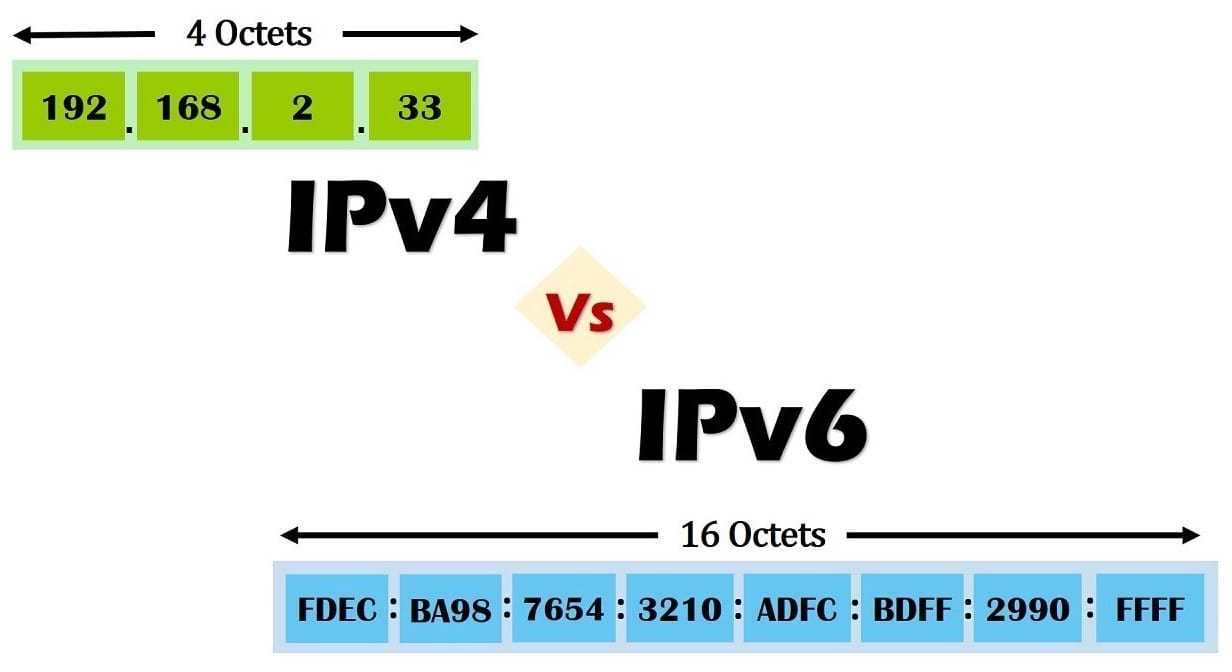
This image shows the difference between an IPv4 address and an IPv6 address. Pay attention to the number of octets! IPv4 has 4 octets and IPv6 has 16 octets.
Some examples of how you could you IP addresses:
- Filter IP addresses on a website to limit traffic from certain regions
- Access websites like “www.google.com”
- Subnet a block of addresses to increase the amount of devices on your network
- Spoof your private network with a VPN address. This is handy for security purposes!
We use IP addresses to designate different devices and websites on a network. In the case of a small network, IP addresses can be used to differentiate devices and help keep the network traffic organized and going in the right direction. As for the Internet, IP addresses are used to communicate with websites, applications, and other devices. IP addresses enable the Internet to have things like websites and communication services. Without IP addresses, the Internet would not be as useful as it today!
Packets
A packet is a small chunk of data that gets sent over a network. This data can be sent in piece, or, if small enough in one packet. Packets contain control information, which tells them where to go and where they are coming from, and user data, which is sometimes called the payload. According to the video “The Internet- Packets, Routing and Reliability Part 4”, packets carry information from one computer to another without having a defined path. Also mentioned in the video, packets carry two parts of information when it comes to guidance, the "to" and "from" addresses. It is important to note that these addresses are IP addresses, which were defined above.
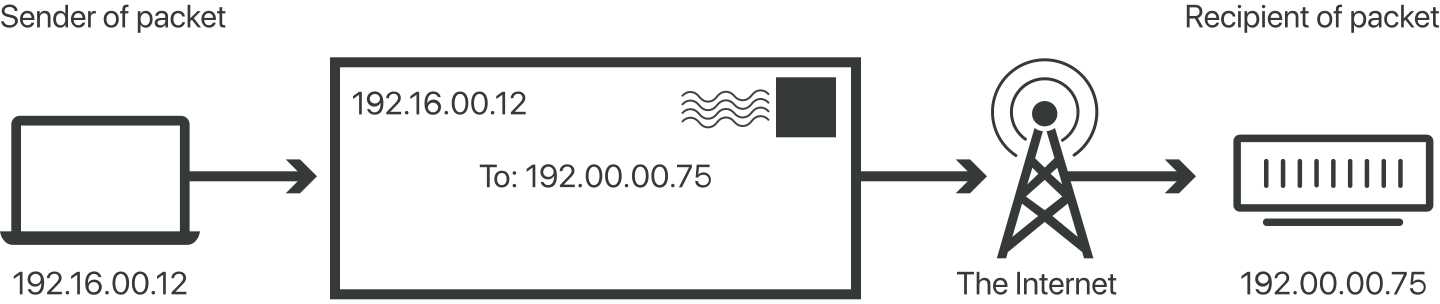
This images shows a packet being sent from the sender to the recipient via the Internet.
Some examples of how packets would be used would be:
- Playing a song from Spotify (as seen in “The Internet- Packets, Routing and Reliability Part 4”)
- Playing a video from YouTube
- Sending a file to a friend
- Downloading software from a website
We use packets to send and receive information in a timely and effective manner. Packets are used to split the data up into “chunks” and send it to the recipient safely. Without packets, we would see data transmission slowing down, or stopped all together. Packets give the users the ability to send large amounts of data to the recipient, which again makes communication over the Internet a whole lot easier. Finally, packets use the transport protocol called TCP. This protocol is used to make sure all data is being sent and receive without any errors, and therefore, it allows for a better user experience. All in all, packets are envelopes of the Internet, as they carry data from one computer to the next ensuring it is not tampered with.
Routing
Routing is the process of directing traffic from different devices on a network. Routing is done through the use of networking routers. These devices are designed to find the “path of least resistance” or in other words the shortest path to the destination. As noted in the video “The Internet- Packets, Routing and Reliability Part 4”, sometimes the best route for data to travel is not always the most direct route. Having multiple routes for data to travel logged inside of the router, allows for something called fault tolerance. This means that if one or more paths are broken there are other routes that become the new “fastest” route. If you have not noticed already, the more routers that you have, the more reliable the transmission of data will be on that network.
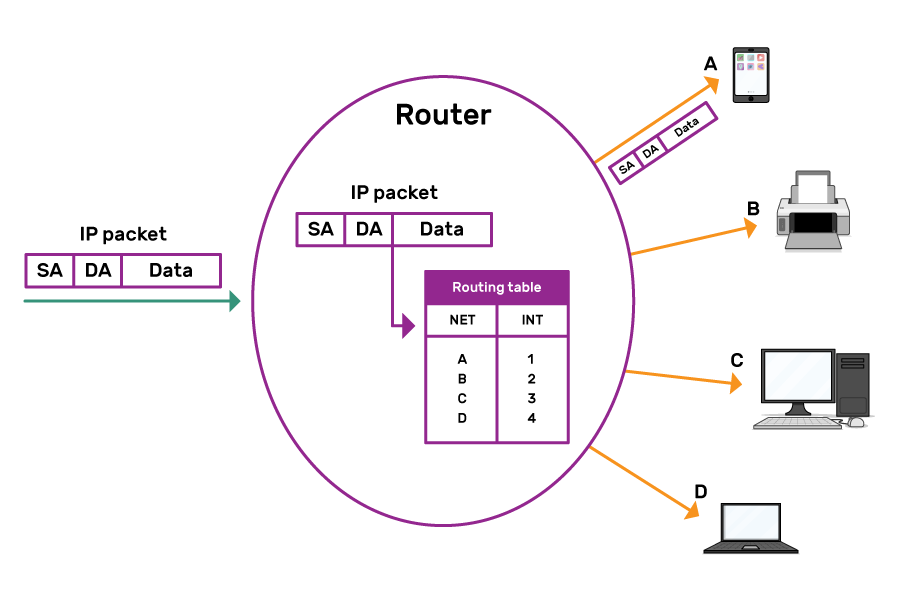
This image shows the process an IP packet undergoes, which is what we talk about here on this page! The user send the packet to a router, which uses its routing table to send the packet to the destination address or addresses using the fastest possible path.
Some examples of routing would be:
- Transmitting songs from Spotify (as seen in “The Internet- Packets, Routing and Reliability Part 4”)
- Transmitting an email across a network
- Connecting a user to a website not hosted on the local network
Routing is the backbone of the Internet’s communication framework. Without this technology, information and data being sent across networks would either never make it to the target or be damaged in transmission. Routing is also used to connect users to websites that are scattered throughout the Internet. Even if the router does not know the address of the site you are trying to access, it will ask other routers around it to help find the IP address for the site. Routing is a useful tool that reshaped how we use the Internet, especially in a global environment. Overall, this technology allows for better use of data transmission and connectivity throughout the Internet.