HTTP and HTTPS Protocols
Hypertext Transfer Protocol (HTTP)
Hypertext Transfer Protocol (HTTP) is a protocol for transferring data across a network. HTTP was commonly used in URLs until its predecessor (HTTPS), which I will talk about later, came along. This protocol is used to communicate with servers, like web servers for websites, in order to receive information or data from them. When you type in a URL, the DNS will translate that domain name into the IP address for the web server. From there the server will receive your request, and in a few milliseconds, will respond to your computer using HTTP. This is done through “get” requests. Everytime you access a new site or page your computer sends a "get" request. When you enter in data on website, your computer sends a “post” request, which means that you are sending/posting data to that web server.
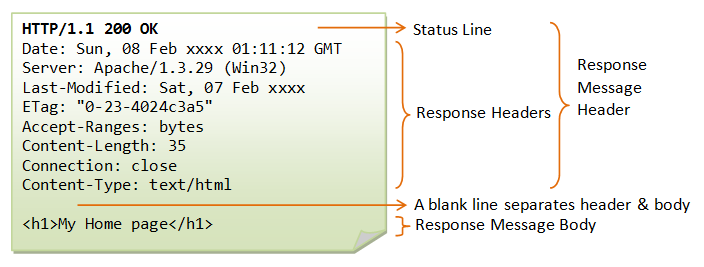
This image is of a HTTP message that a server would send your computer when you do a "get" request.
Some examples of how we use HTTP include:
- Accessing www.google.com using “get” requests
- Trying to access the login page on Tumblr (as seen in “The Internet- HTTP and HTML Part 5”)
- Posting your login data into a website and receiving “cookies” (as seen in “The Internet- HTTP and HTML Part 5”)
We use HTTP because it allows for our computers to communicate effectively with servers and other computers around the world that are on the Internet. It is extremely useful for browsing the web, but can also be used to send files and documents from one computer to another (as seen with the “login” example in “The Internet- HTTP and HTML Part 5”). One topic that I will mention on a different page is HTML. HTTP can help transport HTML files to computers that are trying to access websites. Hypertext markup language (HTML) is used to build, and format websites located on the Internet. While HTTP does sounds perfect, it lacks some security features, which is why HTTPS was created!
Hypertext Transfer Protocol Secure (HTTPS)
Hypertext Transfer Protocol Secure (HTTPS) is the secure version of HTTP. This version of HTTP carries all of the options and utilities that the original HTTP had, except HTTPS has Secure Sockets Layer (SSL) and Transport Layer Security (TLS) added on. Both of these additions help secure the messaging between the end user’s computer and the web server. As mentioned before, when you connect to a website, your computer sends a “get” request to the web server, and the web server will send you the HTML as well as a HTTP message needed to view the site. These communications, under HTTPS, are now secured.

This image shows how HTTPS is secure because of SSL and TLS. The lock icon, which you can see on this site, is shown when a website is using HTTPS. Again, HTTPS deters hackers from stealing the data in the messages between the user and the web server.
Some examples of HTTPS at work include:
- This current website! (Yes, this website uses HTTPS)
- When you try to access https://www.google.com
- When you try to access https://www.cdc.gov
We use HTTPS in order to defend against the bad apples of the Internet. As mentioned on other pages, the Internet is mainly friendly, but like anything else in this world, there are always bad apples. Hackers will try anything to get a hold of your data, especially your session ID key, which is given when you login (as mentioned in “The Internet- HTTP and HTML Part 5”). This piece of information can allow hackers to spoof their key as if it was yours and see your account information for the website you logged in on. In order to protect this information, we (Certificate Authorities and other regulatory organizations) developed HTTPS to encrypt this data and make sure it is secure, until the user’s computer or the web server needs to view it. Without HTTPS, the Internet would be a dangerous place where hackers can easily steal the data that you are sending and receiving. Luckily, we do not have to worry too much about that and can just browse the Internet with ease.